Design for Sourcing: Selecting Components With Viable Alternatives
- ajinkya-joshi
- 518 reads
Check availability, lifecycle status and qualified alternatives during design to reduce supply risks and costly component changes after design freeze.
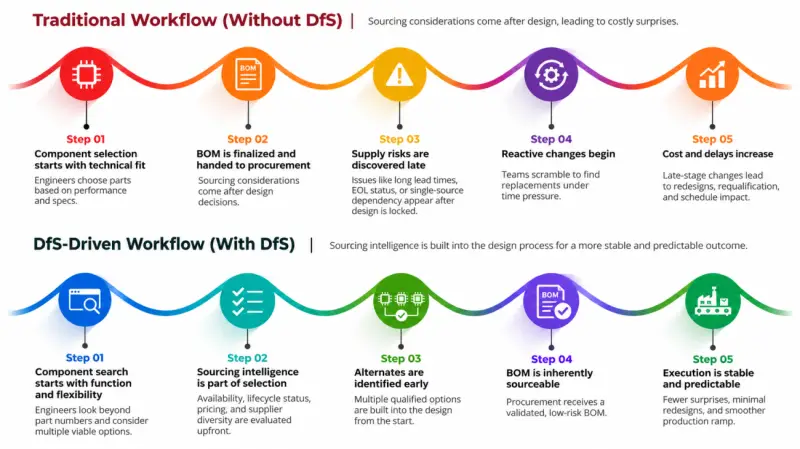
A component can meet every electrical requirement and still put a production schedule at risk. A single-source IC with a 52-week lead time, a multilayer ceramic capacitor nearing end of life, or a MOSFET without a footprint-compatible alternative can turn a finished design into a sourcing problem. The practical response is to consider supply options while selecting parts, before the bill of materials and layout are locked.
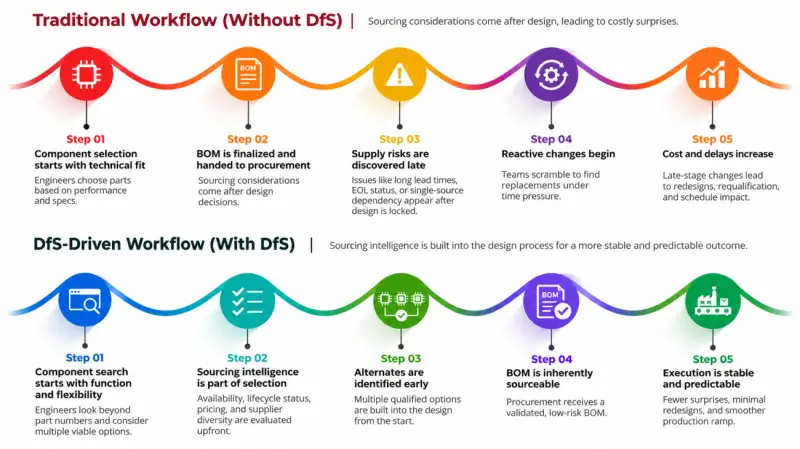
Design for Sourcing brings component availability, lifecycle and alternate options into the same early decisions as electrical performance. That gives engineering and procurement more time to spot dependencies, assess replacements and plan for changes in supply.
Build sourcing questions into component selection
Traditional design work often concentrates on form, fit and function, with procurement assessing price, lead time and supplier availability after the BOM is complete. By then, a change can require schematic and layout updates, compatibility checks, validation and schedule adjustments. Bringing sourcing into the design process helps teams ask a few practical questions before committing to a part:
- Do multiple distributors have the part available?
- Can it be sourced from more than one qualified manufacturer?
- What is its lifecycle status?
- Are there technically suitable alternates, including parts that fit the same footprint?
These questions matter as component lifecycles shorten. Semiconductor parts that could have expected lifecycles of around 30 years in 1970 may now have lifecycles of less than 10 years in many cases. A part that suits a design today can therefore become difficult to obtain earlier than a team expects.
Where sourcing risks become expensive
Some risks stay hidden until prototype builds, production ramp-up or full production. A design may depend on one manufacturer, use a component approaching “not recommended for new designs” (NRND) or end-of-life (EOL) status, or rely on lead times that prove longer than anticipated. If procurement only reviews the BOM after it’s finalized, the team may have little time to respond.
The cost can extend well beyond the replacement component. Accuris describes the following estimates for sourcing-related changes in a mid-complexity design scenario. These are estimates, and the stated costs vary by type of change:
| Cost category | Estimated range | Frequency |
|---|---|---|
| Engineering rework: schematic and layout | $15,000–$80,000 | Per change event |
| Change order overhead after design freeze | $50,000–$250,000 | Per change event |
| Re-verification and compliance testing | $20,000–$100,000 | Per substitution |
| Production delay, including lost revenue or penalties | $50,000–$500,000+ | Per program |
| Spot-market premium when avoiding redesign | 3x–10x standard price | Per purchase order |
| Post-installation failures if quality is compromised | $50,000+ | Per incident |
These figures illustrate why a late substitution is rarely just a purchasing decision. A replacement needs to work with the circuit and board, meet thermal and other applicable requirements, and pass whatever validation is needed for production.
A sourcing checklist for design teams
Start with the component’s function and required performance, rather than locking the design around one manufacturer’s part number too early. That leaves room to consider other parts that meet the same technical needs.

Then check how widely the part is available. Stock at several authorized distributors can give the team more sourcing options; inventory history can show whether that availability has been steady or prone to swings. Compare lead times with the production schedule, and look for suitable parts from multiple manufacturers or suppliers in different regions where possible.
Review lifecycle status before approving a component. Check for EOL notifications, NRND status and last-time-buy notices, then identify alternatives that could be qualified if supply changes. Where possible, document approved alternates in the BOM early, rather than beginning the search after a shortage appears.
For each proposed replacement, verify the details that determine whether it can actually be used: footprint, pinout, electrical characteristics, thermal requirements and any other applicable compliance or validation needs. Ask whether production could continue if a selected part went on allocation tomorrow. A stock check alone can’t answer that; the design needs a viable, assessed replacement.
Choose flexibility where the circuit allows it
Passive components, linear regulators and discrete semiconductors often have options from multiple manufacturers. The 1117 linear regulator family provides one example: Texas Instruments’ LM1117, onsemi’s NCP1117, STMicroelectronics’ LD1117 and Diodes Inc.’s AZ1117 often share an SOT-223 footprint. That shared package can help with board compatibility, but it doesn’t establish that the devices are interchangeable. Dropout voltage and output capacitor requirements still need to be checked in each datasheet.
Components offered in multiple package options can also provide room to adapt a design when supply changes. The trade-off is that a package change may affect the PCB layout, so its value depends on whether the board can accommodate that flexibility.
Further guidance on evaluating alternates and package changes is available in Design for alternates in supply chains and Component package swaps explained.
Use sourcing data alongside electrical specifications
Component research is more useful when engineers can compare technical specifications with stock, pricing, lifecycle status and alternate options in one workflow. Octopart provides these details, along with manufacturer information and inventory history, to support decisions from initial selection through BOM review.
In a March 2026 survey of 439 professionals conducted by Accuris and Fuld & Company, 51% said more than 11% of their designs require component changes after design freeze. That finding highlights how often teams face changes after a design commitment, and why reviewing alternatives before that point can matter.
Octopart’s parametric search lets engineers filter components by specifications, package and other requirements. Its part pages can be used to compare manufacturers and distributor stock, inspect volume-based pricing, and review lifecycle labels such as Active, NRND and obsolete. Inventory and price histories covering up to 12 months can help reveal patterns in availability.
The Alternates tab lets users compare potential replacements and consult datasheets before qualification. The BOM Tool supports review across a full parts list by matching components and displaying distributor offers, prices, stock and lifecycle status. These tools can help teams form a clearer view of sourcing options; they don’t replace checking datasheets or qualifying an alternate for its intended design.
Make the BOM easier to build
Sourcing risk is easiest to address before a design is frozen. A part with a long lead time, limited stock, uncertain lifecycle or no suitable alternate may still be the right choice, but the team should understand those constraints while it can still make design decisions. Reviewing distributor availability, inventory trends, manufacturer options, lead times and qualified replacements alongside electrical performance gives engineering and procurement a shared basis for planning.
When those checks happen early, the BOM can carry more useful options into prototyping and production. The key question at selection time is simple: if supply changes, does the design already have a replacement path the team can verify?
Review a BOM with Octopart’s BOM Tool to check component stock, pricing and lifecycle status across its line items.